How to install AI Deeplayer Dynamics Expert Advisor -July 19, 20125

✅ How to activate URLs for expert torture functions in Metatrader 4 & 5
(Deeplayer Dynamics EA is needed to work correctly)
⚠️ This specific URL is essential for the entire function. Deeplayer Dynamics EA.
Without them, torture cannot be accessible to external AI modules, licenses or sync signal architectures.
✅ Step 1: Start Metatrader 4 or Metatrader 5
Open Deeplayer Dynamics EA Installation and running.
✅ Step 2: Opening the setting menu
movement :
Tools → Options
Or simply press: Ctrl + O
✅ Step 3: Activate key settings
Below Expert advisor Tap, make sure the following options are selected.
☑️ Allows algorithm transactions
☑️Inactive algorithm trading when an account is changed
Disable algorithm transactions when Profile profile is changed
Allow WebRequest for Listed URL.
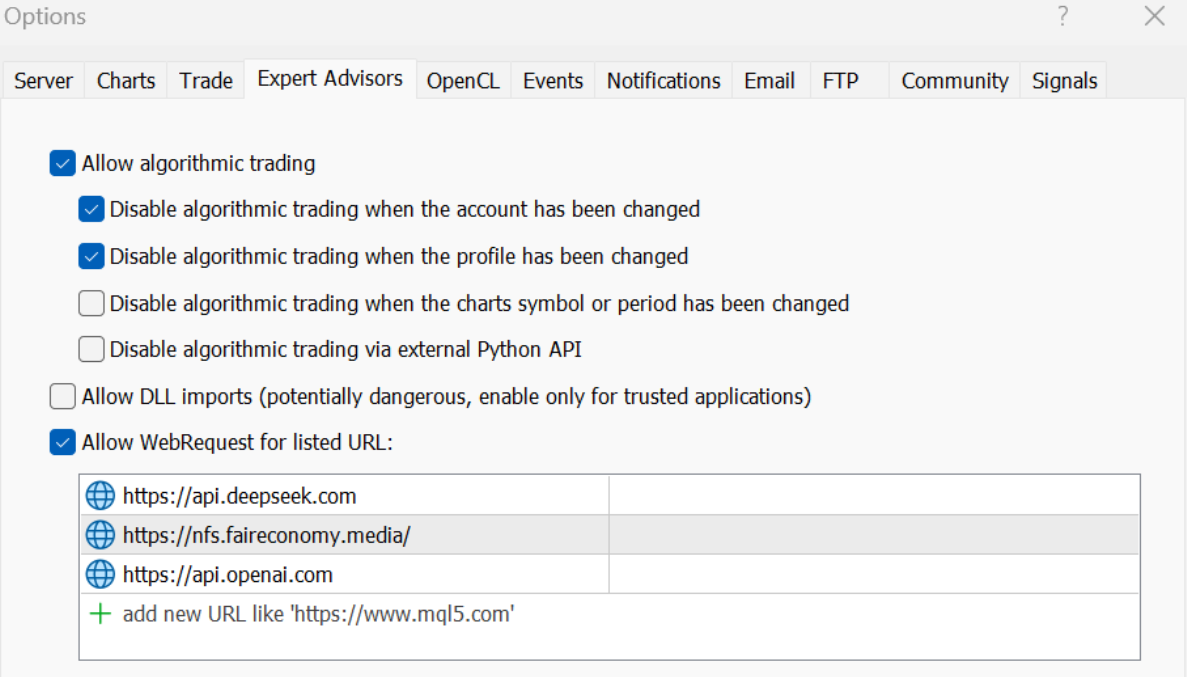
https://api.deepseek.com
https://api.openai.com
https://nfs.faireconomy.media/
You can paste directly or manually enter the webrequest list field.
✅ Step 4: Confirmation and Application
Click great Save the settings.
The torture is now authorized to communicate in real time with external AI cloud infrastructure.
✅ Setting completion
Deeplayer Dynamics EA It is now completely activated by directly accessing the modular AI core, signal synchronization and adaptive GPT -based logic.
🔧 This endpoint is important next.
• Neuro signal integration
• Adaptive strategy shift
• Safety license and activation
• Access for analysis modules with enhanced Openai